Docs
antiloki is a free vibe graphing IDE. You describe the work, the Leader draws the team as a graph, and the loop runs it on the AI subscriptions you already have. These pages describe what the app does today, and say where something is not yet built.
1. Start here
antiloki works on a project folder. Open one, and the Cowork screen shows that project's agents, threads and sagas. Ask the Leader for what you want, and it drafts a team as a graph. You edit the graph, set its budget, and run it.
Run it on a project
- Open a project folder. The project needs to be a git repository for threads and worktrees to work.
- Sign in to at least one AI CLI (see your AI seats). Antiloki only offers the ones you are signed in to.
- Ask the Leader in the Cowork chat, or draw a team on the board yourself.
- Set the budget on the run, then start it. Watch the nodes change state as they run.
- Read the results: the artifacts the run produced, the saga it was recorded in, and the cost of every node.
How a run goes
A run goes through four stages, and you can see each one on the board:
| Stage | What happens |
|---|---|
| Ask | The Leader drafts the graph from your words, or you draw it. The Leader is the only terminal agent in the graph. |
| Check | The validator refuses shapes that cannot run safely. Nothing starts until the graph passes. See what the validator refuses. |
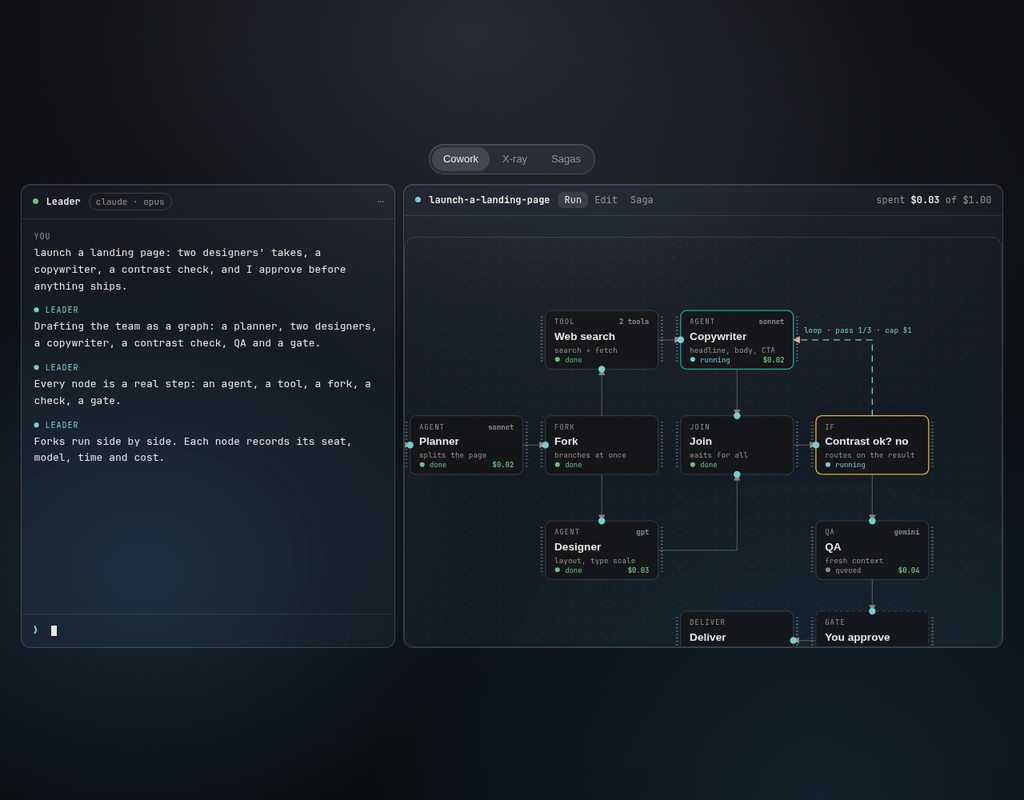
| Run | Each node runs on the seat it names, or the seat the tier picks. Forks run side by side. Each node records its agent, exact model, time and cost. A run stops when it reaches its budget. |
| Judge | QA and audit nodes judge the work. A human gate waits for your yes or no before anything leaves the project. |
2. The Cowork screen
Cowork is where you work. The left side holds the chat with the Leader. The main area holds the panes, and each agent in a pane runs in a real terminal, not a simulation.
Panes and the Studio
Panes sit side by side in the main area. You can fold a pane to a thin strip to keep it without losing its place. A pane can hold a terminal, a frame, a diff, a preview, or one of the Studio tools.
The Studio, on the right, opens the other tools of the app. Some of them, and what each shows:
| Tool | What it shows |
|---|---|
| Terminal | A real terminal, for an agent or for you. |
| Diff and review | What changed, for a thread or a run. |
| Frames | Mockups made by agents, as editable frames. The content is cleaned first: scripts, event handlers, iframes and network addresses are removed. |
| X-ray | The health view of the repo. See the X-ray. |
| Sagas | The goals and their runs. See Sagas. |
| Skill library | The skills agents use, and the drafts waiting for your approval. |
| Code graph, System design, Design canvas, Design system, Authors, Constitution, Git graph, Issues, Notes, Brainstorm | The other tools in the Studio, each opened from its tile. |
Threads and worktrees
A thread is a line of work with its own git branch and its own worktree folder. Two threads can change the same file without clashing until you bring them together.
- Integrate commits each agent's work on its own branch, then merges it into the thread's branch. If a merge conflicts, it is reported and undone. Nothing is forced.
- Land merges the thread's branch into the workspace. It only runs when the workspace has no uncommitted changes, so your own unsaved work is never mixed in.
- Discard throws the thread's branch and worktree away.
The Main thread is the workspace itself. Integrate, land and discard apply to the other threads.
Side questions
A side question is a read-only helper pane bound to one agent. Use it to ask about that agent's work, such as what it changed or why, without sending the agent a message. There is one side question per agent at a time.
3. Teams and graphs
A team is a graph of nodes and edges, edited on the board. Each run of the team is recorded in a saga, and each pass of a loop is its own episode in that saga.
The nodes
Explore the nodes
Pick a node to see what it does and what you set on it.
| Node | What it does | What you set |
|---|---|---|
| Leader | Your terminal agent. It designs the team with you and watches the budget. | Exactly one per graph. |
| Agent | A planner, worker, QA, debugger, audit, or your own custom agent. | Its brief, its skills, its tools, and the seat it runs on (engine:model). |
| Tool | Web search, page reading, or one of this app's own tools. | An allow-list. The node may use only the tools it names. |
| Fork | Starts branches that run side by side. | The branches it starts. |
| Join | Waits for its branches. | All of them, or a quorum. |
| If and switch | Route the run on what a node said. | A condition. A switch needs a default port, so nothing falls through. |
| Loop | Repeats its body until a condition holds. | A max count and a cost cap. Each pass is its own episode. |
| For each | One branch per item, in parallel up to a limit. | The list it walks over, and the limit. |
| Retry | Sends a failed node round again. | How many times, then the exhausted port. |
| Human gate | Waits for your yes or no. | A timeout, and the port taken when it runs out. |
| Cost cap | The most a node, or a whole loop, may spend. | A number in USD. |
| Artifact | A document the run makes, such as a report or a draft. | A name and a format. It is written to .antiloki/artifacts/. |
| Deliver | The end of the graph. The finished pack reaches you. | Nothing. Every graph ends in one. |
What the validator refuses
Try the validator
Tick what your graph has, and see what the validator would refuse. This is a simplified model of its rules; the app checks more.
The validator checks the graph before anything runs. It refuses a graph that has any of these problems, and it names the problem so you can fix it on the board:
| Code | What it means |
|---|---|
no_leader | The graph has no Leader. |
many_leaders | The graph has more than one Leader. |
no_name | The graph or a node has no name. |
no_entry | Nothing starts the graph. |
no_delivery | The graph has no Deliver, so the run has no end. |
unreachable | A node cannot be reached from the start. |
dead_end | A node leads nowhere and is not a Deliver. |
edge_to_nowhere | An edge points at a node that does not exist. |
bad_port | An edge uses a port the node does not have. |
bad_condition | A condition on an if or switch cannot be read. |
switch_no_default | A switch has no default port. |
loop_no_cap | A loop has no cost cap. |
loop_unbounded | A loop has no maximum count. |
unbounded_cycle | The graph loops back on itself without a loop node that bounds it. |
silent_failure_edge | A failure path goes nowhere, so a failure would disappear. |
Artifacts and skills
An artifact is a document a run produces. Artifacts are written inside the project's .antiloki folder, and the next node in the graph reads them. You can open them from the run.
Agents can propose changes to their skills, the instructions and tools they carry. A proposal arrives as a draft in the skill library. Nothing changes until you approve it.
4. Budgets and gates
Money and writes are limited in three places:
- A loop's cost cap. Every loop must have one. When the loop's body reaches it, the loop stops.
- A node's cost cap. Any node can carry one. Its own spend is checked against it.
- The run's budget. When a run reaches its budget, it is stopped. The saga keeps what was spent up to that point.
Writes are fenced by folder. An agent can write only inside the folders its node is allowed to touch. A commit to your branch, a publish, or a message sent outside the project waits at a human gate for your yes or no.
Watch a run hit its budget
Costs are illustrative. The rule is the point: the run stops when the next step would pass the budget.
5. MCP
Antiloki is also an MCP server. Any MCP client can drive it: open threads and panes, read and add sagas, rebuild the X-ray, and design and run teams. Your agents use the same tools, so what an agent does in a pane is visible to you in the app.
The tools
Find a tool
The names below are the tools the server registers today. Ask the client to list them to see the full set.
| Family | Tools |
|---|---|
| Threads and spaces | antiloki_threads, antiloki_spaces, antiloki_worktrees |
| Panes | antiloki_panes, antiloki_pane_open, antiloki_pane_read, antiloki_pane_send, antiloki_pane_view, antiloki_pane_act, antiloki_pane_arrange, antiloki_pane_close |
| Teams | antiloki_teams, antiloki_team_design, antiloki_team_status, antiloki_team_simulate |
| Sagas | antiloki_sagas, antiloki_saga_add, antiloki_episode_add, antiloki_episode_update |
| X-ray | antiloki_xray, antiloki_xray_rebuild, antiloki_xray_open |
| Delegation and checks | antiloki_delegate, antiloki_qa, antiloki_rules, antiloki_query, antiloki_look |
| Frames, screen and themes | antiloki_frame_create, antiloki_screen, antiloki_themes |
Connecting a client
Antiloki's MCP server runs with the app. Connection steps for each MCP client will come with the first download, so check back then.
6. Web apps and the web node
Web apps open in their own pane, from a store, beside your agents. You can keep the apps you use, and open one with a click.
A graph has a web node for research. It works with no model and no key: it searches the web or reads one page, and the nodes after it are told what it found.
What the web node does
- Search order: a Brave key, if you have set one. Otherwise the seat's own web search. Otherwise DuckDuckGo, which needs no key.
- Read only: it makes GET requests for text pages. It has a size cap and a timeout.
- Address guard: it never reads an address inside this machine or its network, so a graph cannot be used to reach a router, a metadata service or the app itself.
- Your own search:
ANTILOKI_WEB_SEARCH_URLcan name another search, as a template with{q}.
7. The X-ray
The X-ray is a health view of the repo, built from the code itself. The panels are below.
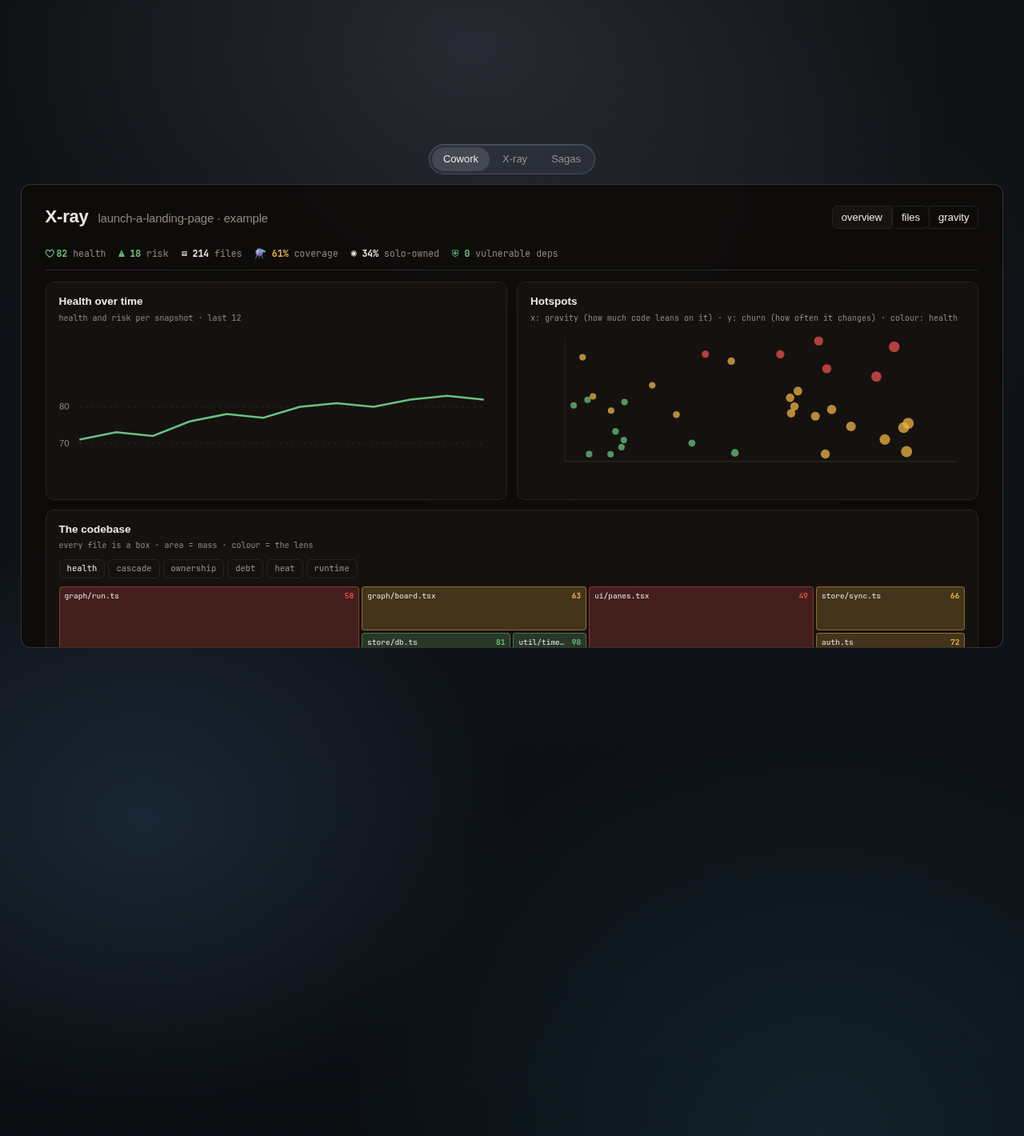
The verdict row
| Field | What it counts |
|---|---|
| health | The overall health score, out of 100. Higher is better. |
| risk | How likely the next change is to break something. |
| files | The source files judged. Tests are not counted here. |
| coverage | The share of executed lines, when a test run has measured it. |
| solo-owned | The share of files written mostly by one person. A high share is a knowledge risk. |
| vulnerable deps | Dependencies with a known vulnerability, counted by severity. |
The panels
- Health over time: health and risk per snapshot, so you can see whether the repo is getting better or worse.
- Hotspots: each file is a point. The horizontal position is its gravity, how much other code leans on it. The vertical position is its churn, how often it changes. The colour is its health. A file far up and to the right needs attention first.
- The codebase: every file is a box. The area of the box is its mass, and the colour is the lens you picked. The lenses are below.
- Laws broken most: the project's rules, ranked by how much they are broken, weighted by the rule.
- Movers since the previous snapshot: the files whose health moved the most, up or down.
- Activity, coverage distribution: the commit history and the coverage spread across files.
The lenses
Switch the lens
Example values. Pick a lens to recolour the same boxes.
A lens recolours the same map so that you can read a different question from it:
| Lens | Question it answers | Red means |
|---|---|---|
| health | Which files are sick? | Dense branching, code that is untested under load, and churn. |
| cascade | If this file breaks, what else breaks? | Many files depend on it, through their imports, directly or not. |
| ownership | Who knows this code? | Recent commits come from a single author. That is a knowledge risk. |
| debt | What is waiting to be done in the code? | TODO, HACK and unused markers. Ten or more is full red. |
| heat | What changes most? | How often the file changed in the last 500 commits. |
| runtime | What do the tests actually run? | Grey means no runtime signal. Otherwise the colour shows how much of the file your tests execute. |
Each file has a "why" line in the lens view. It names the raw driver behind its colour, so a red box is never just a number.
Rebuilding
The X-ray reads the code as it was when it was last built. Rebuild it after large changes, or from the MCP tool antiloki_xray_rebuild. A rebuild re-reads the active workspace's own codebase.
The chat in Cowork can read the X-ray, so you can ask about a score in plain words.
8. Sagas
A saga is a goal and the episodes that get it done. Sagas are listed per project, as a list or a board. Each row shows the progress, the cost, and when it last changed.
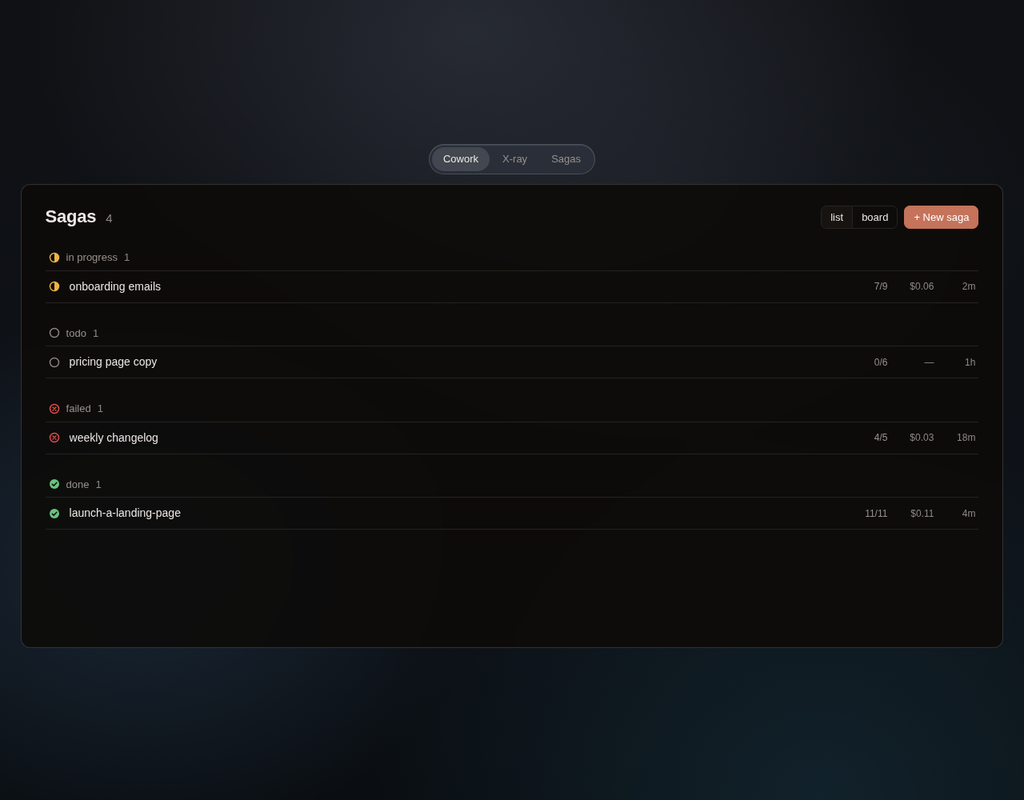
| Status | Meaning |
|---|---|
| todo | Not started. |
| in progress | Work is running on it. |
| done | Finished, with its record kept. |
| failed | A step in it failed. |
| canceled | Stopped on purpose. Kept on the record. |
On the board you move a saga between columns. Moving a saga to done marks its open episodes done; moving it back to todo reopens it. A finished saga stays on the record and cannot be deleted, so the history is the history.
A saga also keeps who did each step: the agent, the exact model, the time, and the cost, taken from the real run.
9. Your AI seats
A seat is one AI tool you are signed in to. Antiloki reads the seat, not the installed program, so a tool that is installed but not signed in is never offered.
| Seat | Notes |
|---|---|
| Claude Code | The Leader's chat in Cowork is a Claude Code seat. |
| Codex | |
| Gemini | Antigravity is preferred when it is present, and Gemini is the fallback. |
| Grok | |
| Cursor | The agent that runs in the terminal, not the Cursor editor. |
| OpenCode | Optional, off by default. |
One seat is enough. A team can use more than one, for example a planner on one and workers on another. A node names its seat as engine:model. A node that names no seat uses the one its tier picks.
10. Install and status
Downloads are coming soon for Windows, Linux and macOS. Nothing here needs an account.
11. Privacy and network
There is no account and no telemetry. The network calls are:
- Your CLIs' own calls to their vendors.
- An update check against a static file on GitHub Releases.
- The fonts the window loads from Google Fonts.
- The web node, only when a graph uses it, and only to the search you chose.
12. Support
Write to support@antiloki.com. Include the project's screen and the node or saga it is about, if you can.